
This feature, located in the Tools section of the left-hand menu, allows users to manage settings and permissions of entities and the users associated with them.
Entities List
The main screen of the Users Management page displays a table with the network's entities organized by hierarchy. The content of the list is shown to the logged-in user based on their Network Permissions. Entries can be expanded under the Display Name column.

|
|
Column Name |
Description |
|---|---|
|
Display Name |
The display name of the entity. |
|
Actions (Each icon is clickable) |
|
|
Type |
The type of the entity. |
|
Linked Agents |
The number of agents in the entity's network. |
|
Status |
The status of the entity. |
|
Created By |
The display name of the entity’s creator. |
Show/Hide Non-Active Entities
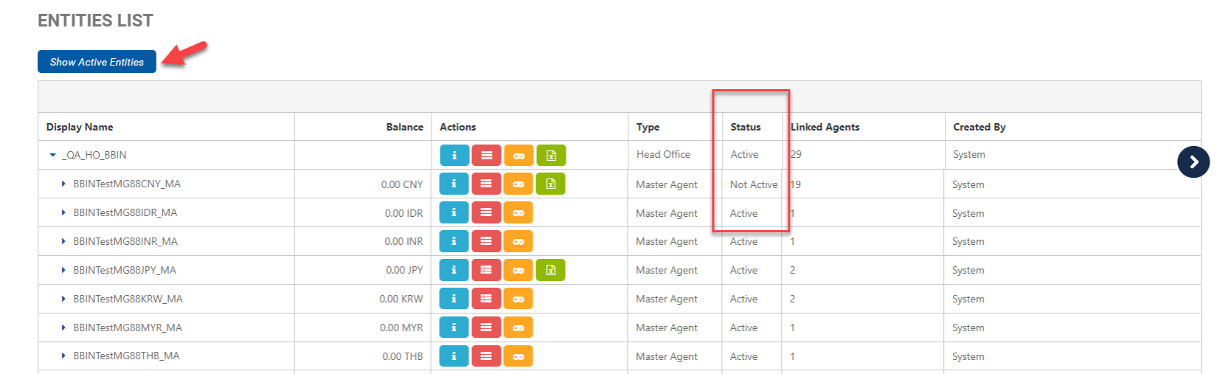
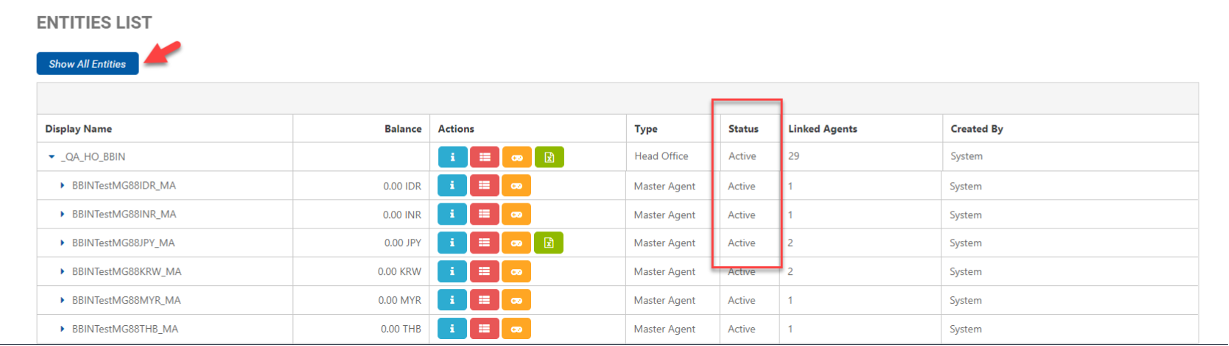
The Entities List displays both Active and Not-Active entities by default. To view only Active entities, click the Show Active Entities button. This will hide all Not-Active entities. User preferences will be saved upon the next login or return to the page. If browsing data is deleted, the user preferences will also be eliminated and the list will revert to its default of displaying both Active and Not Active entities.
|
|
Learn more about managing your entities:
-
Creating a New Entity This article covers how to create a new entity.
-
Editing an Entities Information This article covers how to view and edit an entity's information and configure their permissions.
-
Users List This article covers how to add and edit users.
-
Credits Management This article covers how to set a credit limit to manage financial risks.
-
Content Management This article covers how to enable or disable content for players.
-
Bet Profiles Management The purpose of the Bet Profiles Management feature is to allow business entities to view the list of bet profiles they have.