
The Financial Report provides users with financial data that reflects the financial aspects and status of their network, including deposits, withdrawals, and bets.
The report is based on the CreatedDateUTC of transactions and the GameEndTimeUTC of bets.
Filtering the Financial Report
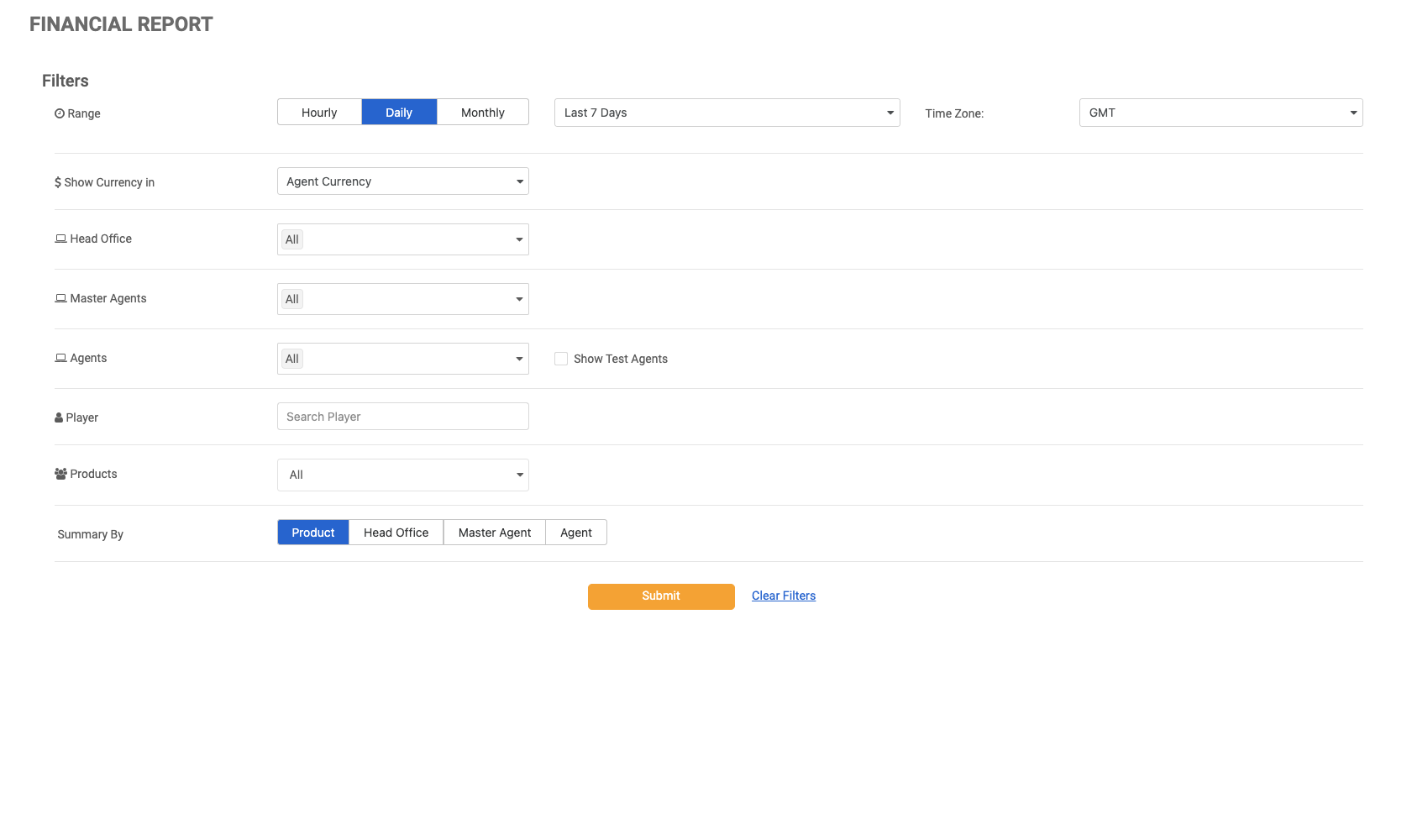
Use the filters to refine your search criteria. Click the Submit button to view the results, or click Clear Filters to reset and start over.
|
|
Filter |
Description |
|---|---|
|
Range |
The date and time range can be specified using the provided parameters. Hourly - The maximum search range is 3 days within the last 30 days. Daily - The maximum search range is 90 days. Monthly - The maximum search range is limited to 24 months. |
|
Time Zone |
Changing the time zone will impact the time zone displayed in the results. Setting the time zone enables Master Agents and Head Offices to view financial information from all Agents in one time zone. The default time zone will be based on the chosen time zone in the Settings page. If the user does not modify the time zone, the default time zone will be set to GMT+0. |
|
Show Currency In |
Users can select a currency in which to view the data from their reports. The Player Currency is the currency that was originally used for the transactions, while the other currencies in the list will convert the data to the chosen currency. The conversion rate from the previous day will be used to convert the current day's data. |
|
Entity Filters |
Users can apply filters to view the data relevant to the entity. The default option is set to All. The Agents drop-down menu is accompanied by a checkbox that allows the user to filter the client's test agents (marked in red). By default, the Show Test Agents checkbox is unchecked. This option will be disabled for clients that do not have test agents on the MG+ system. |
|
Player |
The results can be filtered for a single player's data by searching for them using the text box. |
|
Products |
This drop-down menu can be used to filter the report to include a single product, multiple products, or all products. |
|
Summary By |
Users can choose how to summarize the report, which will determine the structure of the report. |
Functionality of the Financial Report
To adjust the filters for resubmission, click Filter (this may be displayed as an icon or as a link labeled +Filter).
Clicking on the Export button will provide the user with an Excel .CSV file of the table summary.
Financial Report Table One
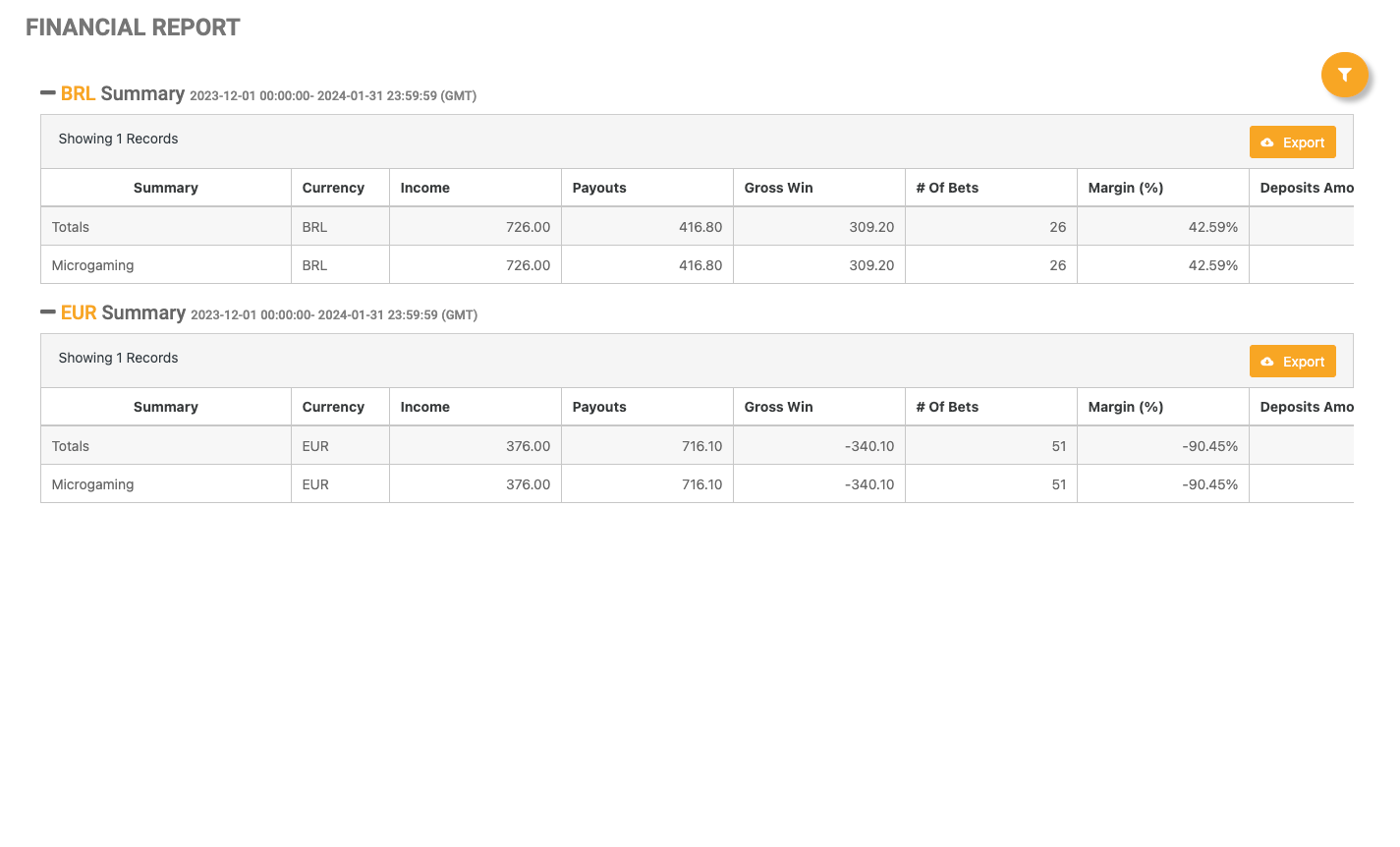
Once the report has been submitted, the Summary section will be displayed based on the chosen Summary By option.
If Show Currency In is set to Player Currency, the summary section of the report will be divided by currency type, which is relevant for clients dealing with multiple currencies.
|
|
Column Name |
Description |
|---|---|
|
Summary |
The selected summary view as set by the filters. |
|
Currency |
The selected currency as set by the filters. |
|
Income |
Sum of bets made. |
|
Payouts |
Sum of payouts made. |
|
Gross Win |
Income minus payouts. |
|
Number of Bets |
Number of bets made. |
|
Margin |
Gross win over income; calculated as a percentage. |
|
Deposits Amount |
Amount of deposits made. |
|
Withdrawals Amount |
Amount of withdrawals made. |
|
Net Cash |
Difference between the Deposits Amount and the Withdrawals Amount. |
|
Number of Deposits |
Number of deposits made. |
|
Number of Withdrawals |
Number of withdrawals made. |
Financial Report Table Two
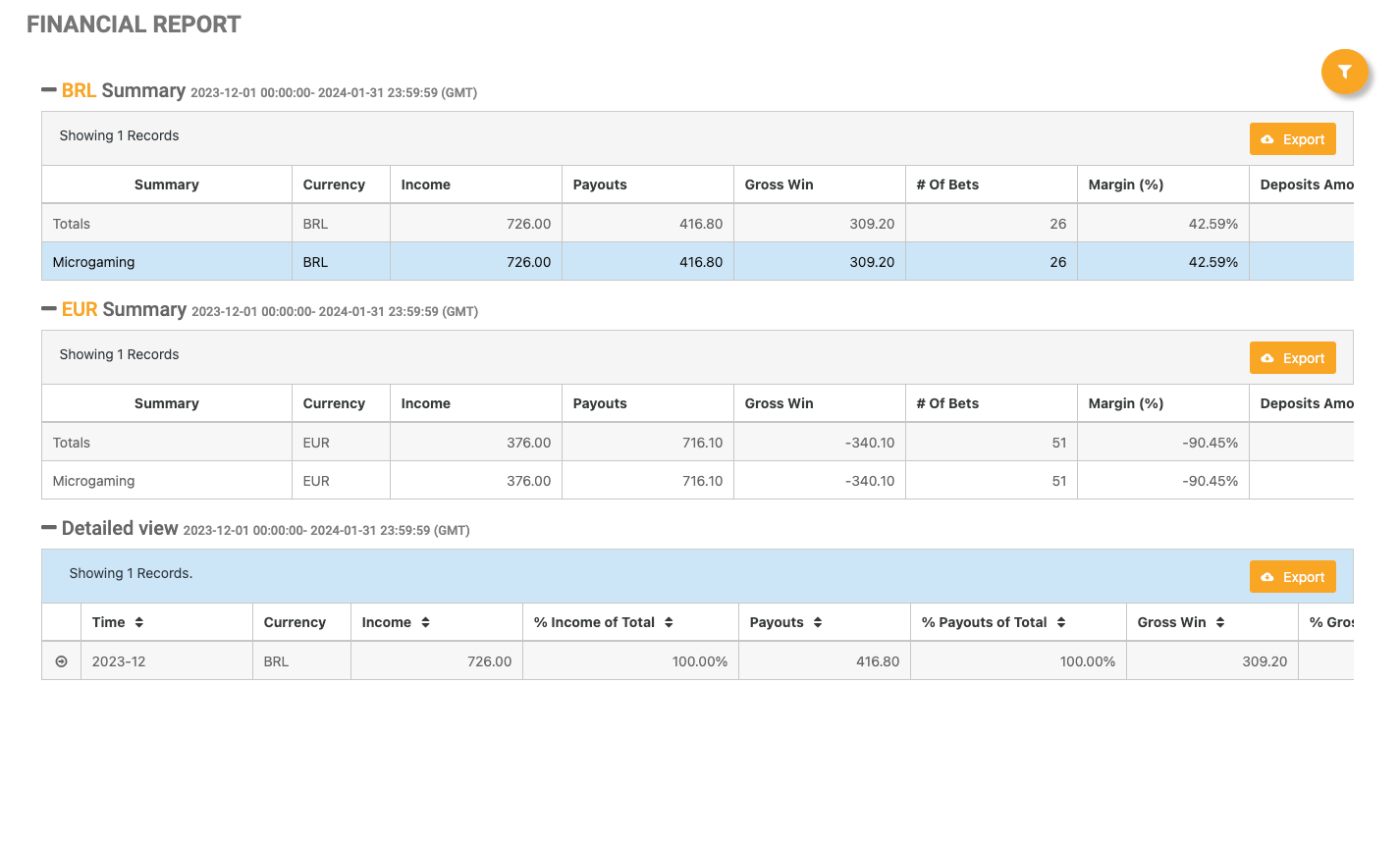
To access the detailed view table, a specific row can be selected from the summary level of the report. Clicking on one of the rows will open the details.
|
|
Column Name |
Description |
|---|---|
|
Time |
The results per the chosen time range. |
|
Currency |
The selected currency as set by the filters. |
|
Income |
Sum of bets made. |
|
% Income of Total |
The percentage of the income over the total amount displayed in the income column of the first table. |
|
Payouts |
Sum of payouts made. |
|
% Payouts of Total |
The percentage of the payouts over the total amount displayed in the payouts column of the first table. |
|
Gross Win |
Income minus payouts. |
|
% Gross Win of Total |
The percentage of the Gross Wins over the total amount displayed in the Gross Win column of the first table. |
|
Number of Bets |
Number of bets made. |
|
Margin |
Gross win over income; calculated as a percentage. |
|
Deposits Amount |
Amount of deposits made. |
|
Withdrawals Amount |
Amount of withdrawals made. |
|
Net Cash |
Difference between the Deposits Amount and the Withdrawals Amount. |
|
Number of Deposits |
Number of deposits made. |
|
Number of Withdrawals |
Number of withdrawals made. |
Financial Report Table Three
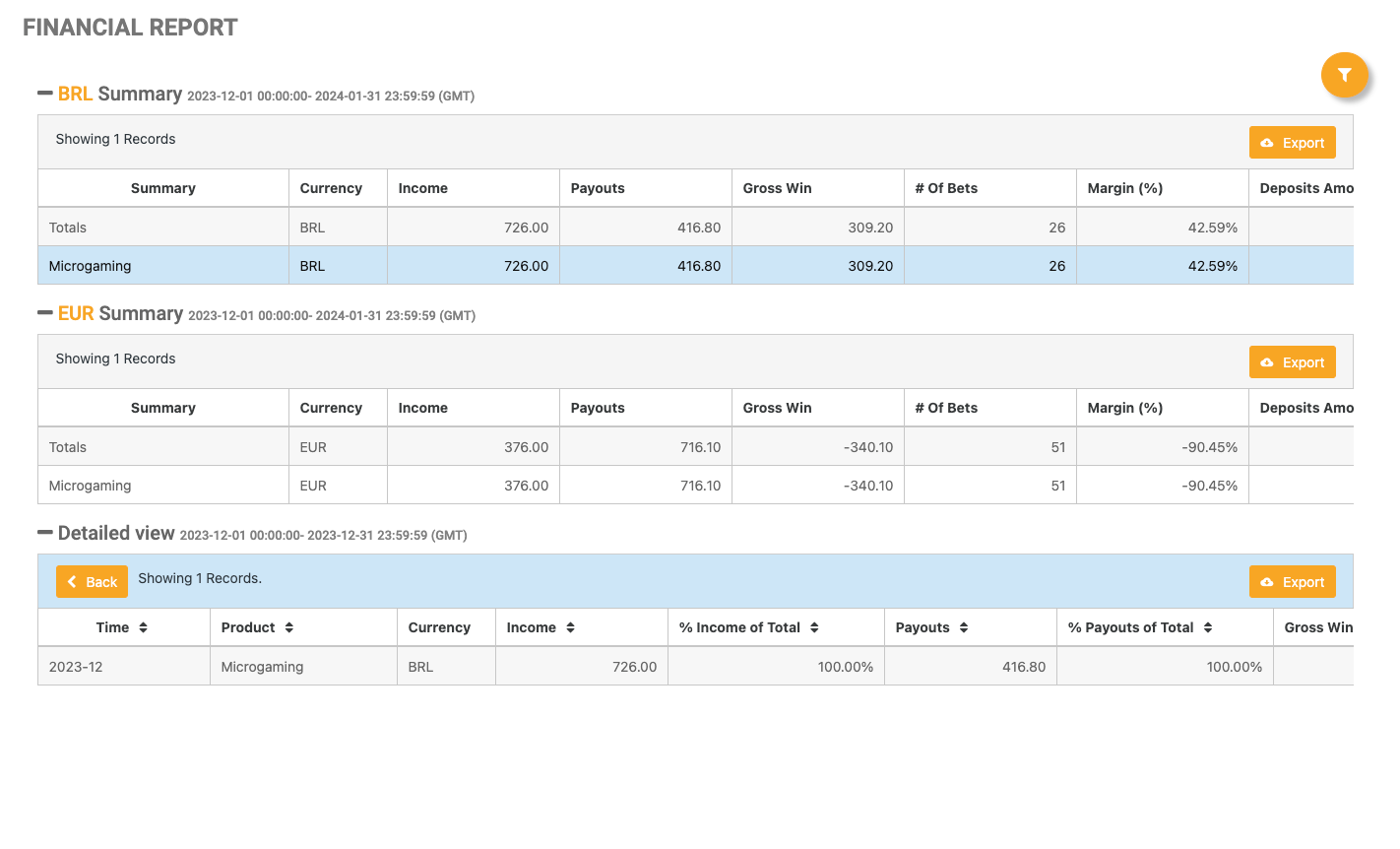
By clicking the arrow on the left side of one of the rows in the Detailed View section (table two of the report), a third table with additional aggregations will be revealed. Navigate back to view table two by clicking the Back button.
|
|
Column Name |
Description |
|---|---|
|
Time |
The results per the chosen time range. |
|
Product |
The name of the product. |
|
Currency |
The selected currency as set by the filters. |
|
Income |
Sum of bets made. |
|
% Income of Total |
The percentage of the income over the total amount displayed in the income column of the first table. |
|
Payouts |
Sum of payouts made. |
|
% Payouts of Total |
The percentage of the payouts over the total amount displayed in the payouts column of the first table. |
|
Gross Win |
Income minus payouts. |
|
% Gross Win of Total |
The percentage of the Gross Wins over the total amount displayed in the Gross Win column of the first table. |
|
Number of Bets |
Number of bets made. |
|
Margin |
Gross win over income; calculated as a percentage. |
|
Deposits Amount |
Amount of deposits made. |
|
Withdrawals Amount |
Amount of withdrawals made. |
|
Net Cash |
Difference between the Deposits Amount and the Withdrawals Amount. |
|
Number of Deposits |
Number of deposits made. |
|
Number of Withdrawals |
Number of withdrawals made. |