
The Betcheck page enables users to view all the bets/tickets and financial transactions of a specific player.
Filtering the Betcheck List
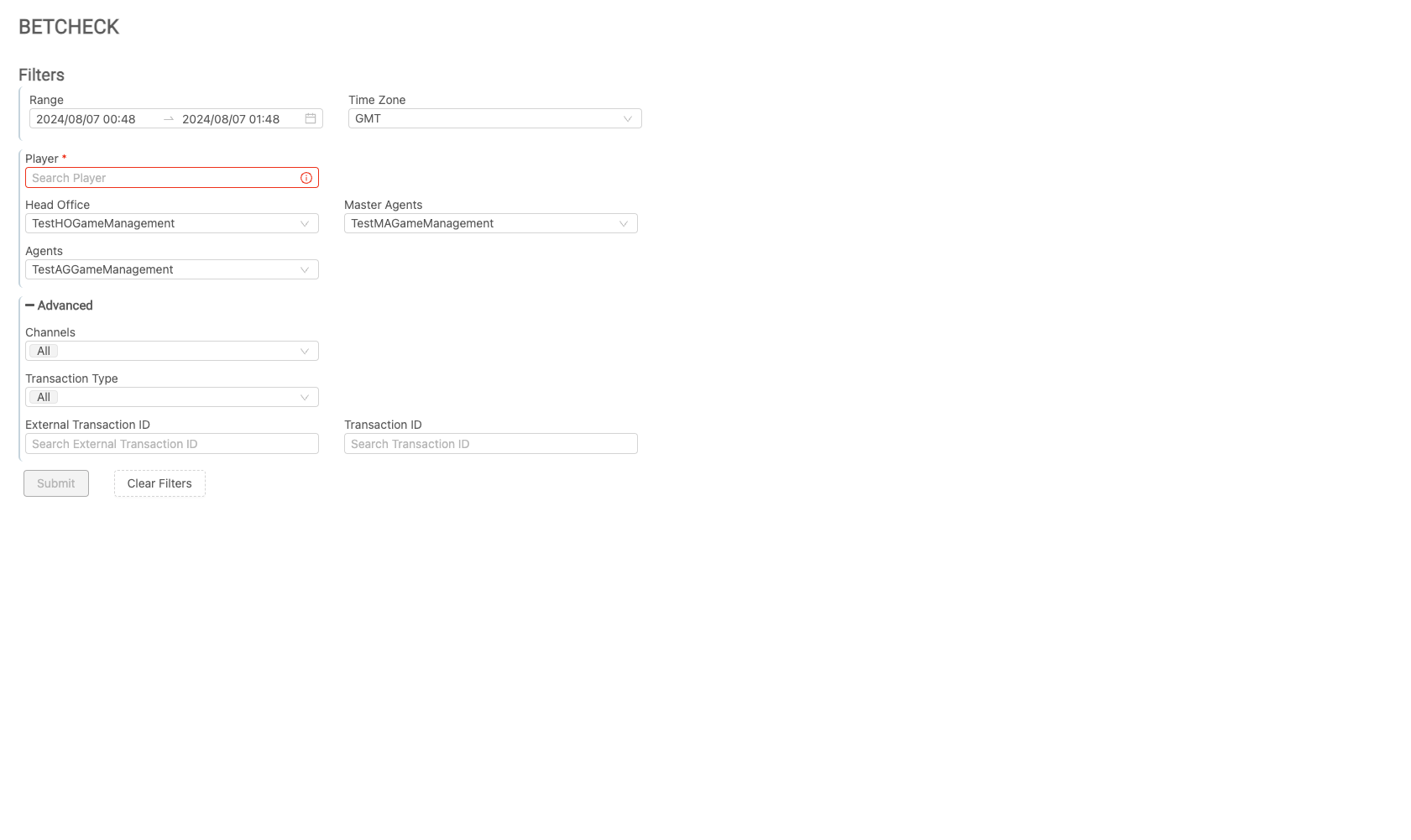
Use the filters to refine your search criteria. Click the Submit button to view the results, or click Clear Filters to reset and start over.
|
|
Filter |
Description |
|---|---|
|
Range |
The date and time range can be specified using the provided parameters. Users can search data up to 10 days old. The date picker will be disabled for dates that are 10 days before the current date and for future dates. Two pre-defined periods are available for quick selection: Last 7 Days and Last 10 Days. Once the filters are configured and submitted, the Open Bets tab will show all open bets of the player regardless of the chosen range. |
|
Player |
The results can be filtered for a single player's data by searching for them using the text box. The Player text box is a required field. |
|
Entity Filters |
Users can apply filters to view the data relevant to the entity. Only one value can be chosen from the drop-down menu. For menus with only one option, the option will be automatically displayed and selected. |
|
Channels |
This drop-down menu can be used to filter the report by one, several, or all channels. |
|
Transaction Type |
This drop-down menu can be used to filter the report by selecting one, multiple, or all transaction types. |
|
Transaction ID |
This field allows users to search for a specific MG+ transaction ID. |
|
External Transaction ID |
Users can search for a specific financial transaction ID that was provided to the user as part of API calls. |
Functionality of the Betcheck List
To adjust the filters for resubmission, click Filter (this may be displayed as an icon or as a link labeled +Filter).
Clicking on the Export button will provide the user with an Excel .CSV file of the table summary.
Upon submitting their filter configurations, users will see two tabs: Player Journey and Open Bets. The Betcheck report is limited to the last 10 days and will return the top 100,000 rows, even if there are more than this in the database.
Filter Search
Users can search for a specific value or filter columns by clicking on the hamburger menu icon in the column header. This icon is visible when the user hovers over specific columns.
-
Choose the relevant criteria to find the value needed.
-
Click Clear to remove the value entered.
-
Click Reset to reset the filtered column.
Player Journey
The Player Journey tab provides a comprehensive view of all closed bets/tickets and financial transactions of the player, along with visual results of each bet.

|
|
Column Name |
Description |
|---|---|
|
Action |
The Action option is only available on bets transactions. Clicking on the info icon will bring up a visual presentation of the bet (product's playcheck). |
|
Transaction Time |
The time that the transaction was made. |
|
Transaction ID |
The Transaction ID generated by MG+. |
|
External Transaction ID |
ID of the transaction as stored in the Agent's system. |
|
Single Wallet Bet ID |
Bet ID provided by the operator. This column is visible only when the player has a Single Wallet player ID. |
|
Channel |
The game channel accessed by the player. Only Bets/Tickets transaction types will show the channel access information. Financial transactions will not include channel details. |
|
Transaction Type |
There are two types: Financial or Bets/Tickets.
|
|
Performed By |
This will be displayed only for deposits or withdrawals, indicating whether the action was performed by an Agent API or a MG+ Backoffice user. |
|
Currency |
The currency code of the transaction. |
|
Bet Placed |
The bet amount of each bet. |
|
Total Payout |
Total payout amount. |
|
Balance Change |
The calculation between the Total payout minus the Bet placed. This calculation is per row and not a running balance. |
|
Transaction Status |
This is relevant to bets/tickets transactions only. It shows statuses as closed or cancelled bets/tickets. Financial transactions will always have a success status. |
|
Product Player ID |
Internal Player's ID on the product side that may be shown on the product's Playcheck page. |
Open Bets
The Open Bets tab displays all open bets (bets placed and payouts available) of the player. Only Providers in which the player has an open bet with will appear. All games will be organized under the Channel - you can expand the list of games by clicking to open the group in the first column.

|
|
Column Name |
Description |
|---|---|
|
Group |
Used to expand or minimize the game list under a specific channel. |
|
Channel |
The game channel accessed by the player. |
|
Game Name |
The name of the game. |
|
Platform |
The platform that the game was accessed from. |
|
Currency |
The currency code of the transaction. |
|
Bets on Table/Open Bets |
Shows the total amount that the player has placed on bets that are not closed. |
|
Payouts on Table |
Shows the total amount that the player has won on bets that are not closed. |