This article covers how to view and edit an entity's information and configure their permissions.
Logged-in users with the permission to add or edit entities can edit existing entities by clicking the Entity Info i icon. Those without permission to add or edit entities will see the information in this page as disabled. Additionally, users cannot edit their own Entity Owner.

|
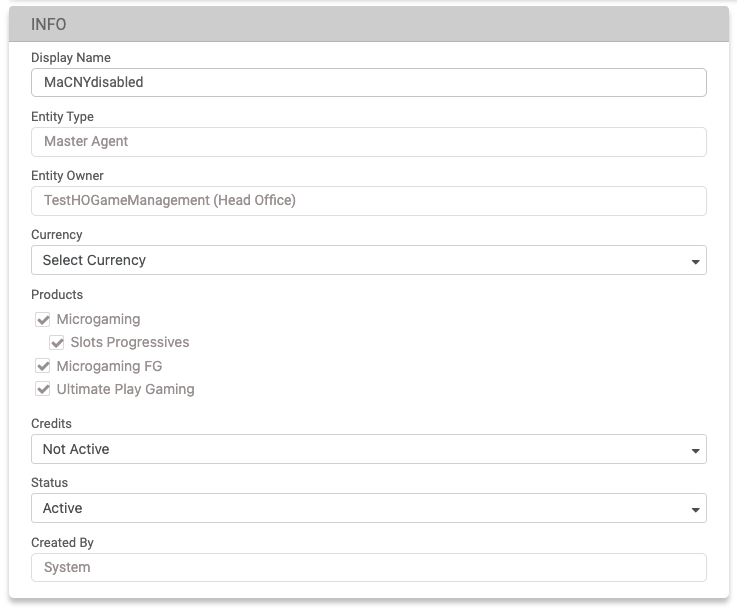
Info
|
Field |
Description |
|---|---|
|
Display Name |
The display name of the entity. |
|
Entity Type |
This can be a Master Agent or an Agent and will be automatically prefilled according to the entity owner. |
|
Entity Owner |
This is the display name of the entity owner and will be automatically prefilled. |
|
Currency |
Available currencies. See more in the Currency section below. |
|
Credits |
See the Credit Management page. |
|
Status |
The status can be switched from Active to Not Active and vice versa. If changed to Not Active, all subordinate entities and users in the same network will be automatically set to Not Active upon saving. When the status is changed to Active, only the current entity will be active. |
|
Created By |
Displays the name of the user who created the entity. |
Currency
-
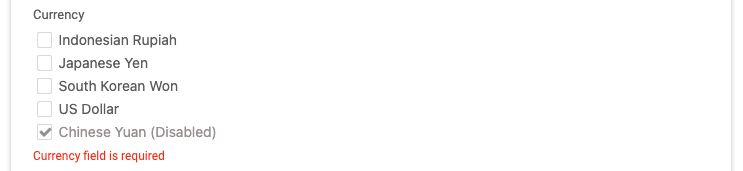
Disabled Currencies by the Head Office - If a currency has been disabled by the Head Office, the entities under that Head Office that are using that currency will have their Status automatically set to Not Active. To activate the entities, the System Admin must enable the currency for the Head Office account. Entities with the disabled currency alongside active currencies, and with an Active status, will remain active, and their players can continue playing.

-
A Master Agent adds a new currency - The Master Agent can have a list of multiple currencies that is the same as the one available to the entity owner. If a new currency is added to the Head Office parent entity, this currency will also be available for all its child Master Agents. To enable more than one currency for the Master Agent, the operator needs to request this ability from their Account Manager during or after the Head Office deployment. Once this ability is enabled, all Master Agents in the network will be able to have more than one currency, for both existing and new Master Agents, and it cannot be changed back. It is possible to disable a currency on the Master Agent level, which will prevent new agents from being created with this currency under this Master Agent, though the Head Office and other Master Agents will still be able to create new agents with this currency. If the currency is disabled on the Head Office/Master Agents level, existing agents can continue to use the system until their status becomes Not Active.

-
Disabling currencies for the Master Agent - To disable the currency for the Master Agent, uncheck the selected currency check box and save the changes. It is essential that the Master Agent entity has at least one active currency. If the Master Agent only has one currency and it is disabled by the Head Office, creating new agents under this Master Agent will not be possible until a new active currency is added to this Master Agent, or the disabled currency is reactivated.
Permissions
Permissions can be edited by removing or adding them. If a permission is removed from an entity, it will be automatically removed from all lower level entities and users in the entity's network after saving. If a permission is added, it will only be added to the entity and its Admin users.
API Info
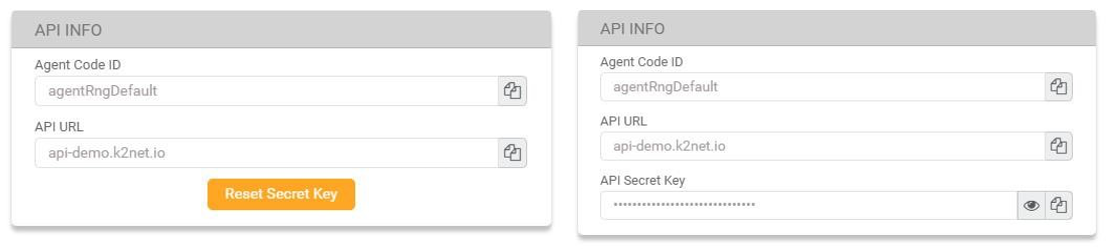
By clicking the Reset Secret Key button, users can reset the Agent's API secret key. This will generate a new key and invalidate the previous one.
Default Bet Profiles
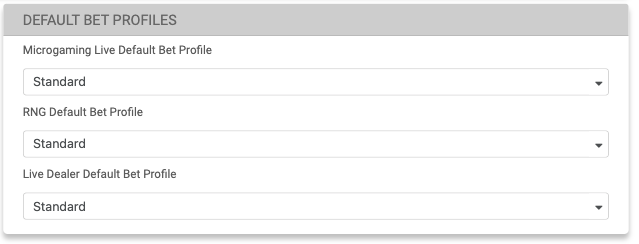
This section is applicable only to Agent entities and will be displayed after users have saved their newly created Agent entity.
In this section, users can set the default bet profiles for games. Any future created players will be assigned to the default bet profiles that have been set by the user.