
Lobby CMS User Guide
Breadcrumbs

Lobby Types

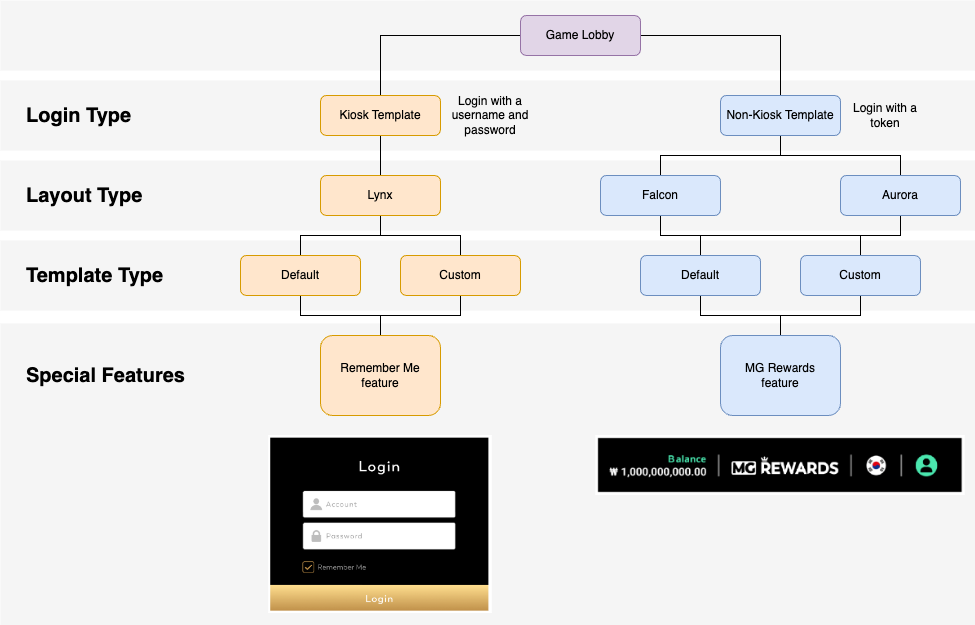
There are three lobby templates that can be configured in the Lobby CMS:

  • Lynx

  • Falcon

  • Aurora

For non-kiosk templates, Aurora lobby is typically selected. The Falcon lobby is rarely used and may be deprecated in the future.
Untitled Diagram-1730688425623.drawio.png

Layout Differences

Special Feature

Lynx

Falcon

Aurora

Login Type

Kiosk template.

  • Login with username and password.

  • Includes Remember Me option on the login page.

Non-Kiosk template.

  • Login with token

Non-Kiosk template.

  • Login with token

Category List Display

  • Desktop - category navigation section is visible on the landing page.

  • Tablet/Mobile - accessible via drop down menu.

  • Simple template, no category navigation. All content displayed on the landing page.

  • Desktop - category navigation bar visible at the top of the landing page.

  • Tablet/Mobile - accessible via hamburger menu.

Category List Features

  • Parent categories can have child categories.


Must-Have Categories


  • All Games is a required category for this template, and will always appear last in the lobby.

  • If no games are added to the All Games category, it will be hidden from the landing page.

  • All Games, Top Games, and New Games are required categories and will always appear first on the category list.

  •  If no games are added to the All Games Category, it will be hidden from the landing page.

Favourites Feature


  • The Favourites category appears only when a player marks a game as favourite.

  • Player-favourited games can be accessed from the banner.

Game Launch Behaviour

  • Desktop - clicking the game icon launches the game in a new window.

  • Tablet/Mobile - game launches in the same window.

  • Clicking the game icon launches the game in the same window on both Desktop and mobile.

  • Clicking the game icon launches the game within the lobby.

MG Rewards Icon


  • MG Rewards can be enabled in the header/navigation bar; clicking it directs the user to the MG Rewards page.

  • MG Rewards can be enabled in the header/navigation bar; clicking it directs the user to the MG Rewards page.

Theme

  • Dark Theme

  • Light Theme

  • Dark Theme

  • Dark Theme

  • Light Theme