
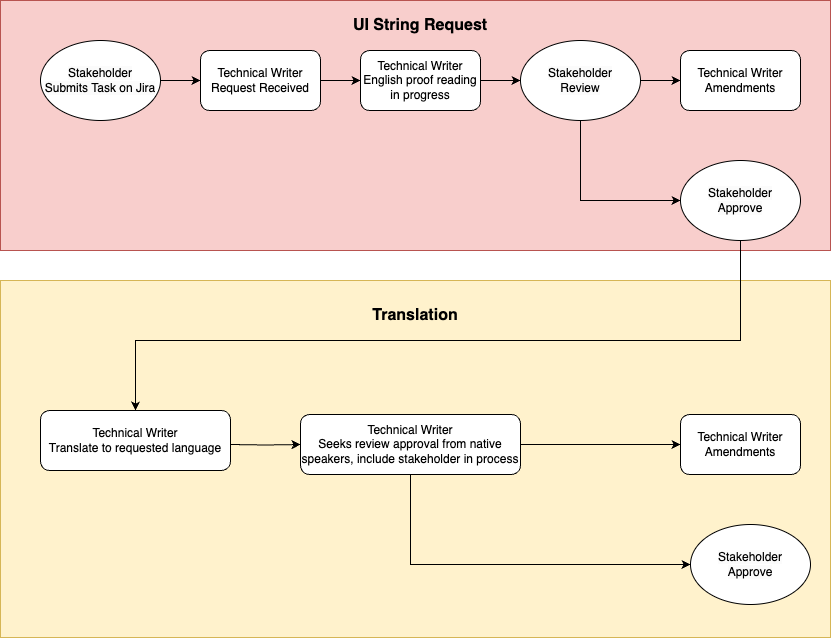
This particular process is intended for making English grammar corrections for UI strings and translations into other languages.
Timing estimation: 1 week.
Workflow
-
For the English proofreading section, the Technical Writer will
-
Table in Jira task → Comment directly in the cell with the suggested change in Red.
-
Confluence page → Use the comment feature to suggest changes. If the changes are accepted, please click the Resolve function in the comment box.
-
How to log the Jira ticket
Example of a Jira Ticket - https://bigasiajira.atlassian.net/browse/RDOC-109
-
Access the Jira board.
-
Click the Create button. A Create issue page will pop up.
-
Fill in the fields per the instructions below. Once you’re done with the form, click Create and your task will follow the workflow process.
-
If submitting a Confluence page - submit only one Confluence page per request.
-
In order to convey your desired modifications effectively you could:
-
Attach a link to a wireframe (eg. an Overflow board) including the password for more context.
-
Attach screenshots of a mockup of the page.
-
Paste links to relevant Confluence pages in the description section of the Create issue form.
-
|
Field |
Required? |
Notes |
|---|---|---|
|
Project |
☑️ |
Ensure that RCT Documentation (RDOC) is selected from the drop down menu. |
|
Issue type |
☑️ |
Choose Story from the drop down menu. |
|
Status |
☑️ |
Ensure that Backlog is selected from the drop down menu. |
|
Summary |
☑️ |
Fill in this field with a short description. |
|
Components |
❎ |
Ignore this field. |
|
Attachment |
Optional |
|
|
Description |
☑️ |
|
|
Reporter |
☑️ |
The submitter for the task and the main contact person. |
|
Linked issues |
❎ |
Ignore this field. |
|
Fix versions |
❎ |
Ignore this field. |
|
Assignee |
❎ |
Ignore this field. |
|
Priority |
❎ |
Ignore this field. |
|
Labels |
❎ |
Ignore this field. |
|
Epic Link |
❎ |
Ignore this field. |
|
Parent |
☑️ |
Select the Epic link: UI Strings (RDOC-19) |
|
Due date |
☑️ |
|
Translation Table
|
English |
Chinese |
Japanese |
|---|---|---|
|
|
|
|