-
New tasks will be automatically assigned to the Submissions column.
-
Checklist template chosen.
-
Tasks in the Pending column are awaiting more details/on hold items.
-
When enough information is collated, the writer will move the task to the Writing in Progress column.
-
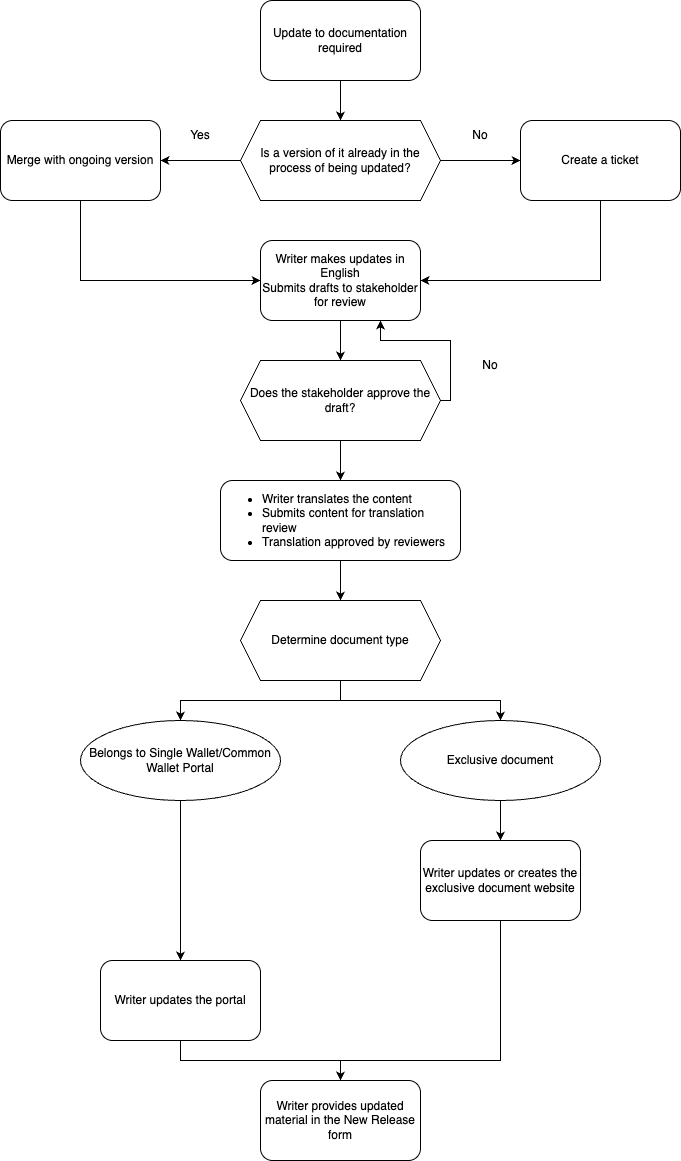
Once the writing phase is complete, the writer will transition the task to the Stakeholder Review column and notify the respective stakeholder by tagging them in the comments. The stakeholder is encouraged to provide feedback on any potential enhancements or express their approval for the content to proceed to translation/publication.
-
For reviews of manuals and guides, the documents are exported in PDF format, with each iteration denoted as "Draft x" in the file name. Reviewers can utilize a PDF reader to annotate and comment on the content.
-
For UI Strings and Swagger requests:
-
They are presented in a table within the comments section of the ticket for easy reference and feedback.
-
In cases where the volume is substantial, the task is linked to a dedicated Confluence page.
-
-
Once the content is approved, the latest draft version will be attached to the New Release form documentation section for other people to reference for writing the GN.
-
-
Translations into subsequent languages will be initiated only after the completion and confirmation of the English version, which is finalized through the Stakeholder Review process. Once the English version is confirmed, no further alterations are permitted to maintain synchronization.
Refer to the Translation Review Process page for information on how the review process works. -
Upon securing approval, the writer will proceed to transition the task to the Move to Publish column for guides or manuals.
-
The task will be moved to the Complete column once all content is published.
Flowchart