
The Dev Portal is a hub of APIs for operators to utilize. It is separate from the API Documentation, which acts as detailed how-to guides to explain our APIs.
For updates to API Documentation, please refer to this section.
The Dev Portal is maintained across a variety of teams. Documentation does not have the ability to edit and publish changes to the Dev Portal.
Documentation’s role in the API Dev Portal consists of:
-
Providing suggestions on how to rephrase content provided by PO’s
-
Come up with ways to write the content to describe the API
-
Grammar updates
-
Translation into Chinese
Documentation cannot:
-
Update and publish changes without the API Product Owner’s involvement
-
Change response examples
Requests regarding content updates to documentation in the Dev Portal must first be communicated to the API's Product Owner, who will submit the change request to the technical writer for review. Therefore, please email your requested updates to the Product Owner to communicate your changes and they will organize the deployment accordingly.
Workflow
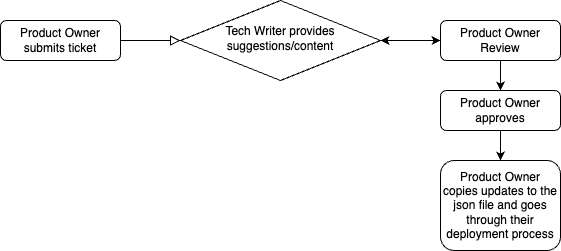
How to log the Jira ticket (API Product Owners Only)
Example of a Jira Ticket - https://bigasiajira.atlassian.net/browse/RDOC-78
-
Access the Jira board.
-
Click the Create button. A Create issue page will pop up.
-
Fill in the fields per the instructions below. Once you’re done with the form, click Create and your task will follow the workflow process.
|
Field |
Required? |
Notes |
|---|---|---|
|
Project |
☑️ |
Ensure that RCT Documentation (RDOC) is selected from the drop down menu. |
|
Issue type |
☑️ |
Choose Story from the drop down menu. |
|
Status |
☑️ |
Ensure that Backlog is selected from the drop down menu. |
|
Summary |
☑️ |
Fill in this field with a short description of what needs to be changed. |
|
Components |
❎ |
Ignore this field. |
|
Attachment |
Optional |
|
|
Description |
☑️ |
Paste the table below into the description of the Jira task. |
|
Reporter |
☑️ |
The submitter for the task and the main contact person (see table template section below). |
|
Linked issues |
❎ |
Ignore this field. |
|
Fix versions |
❎ |
Ignore this field. |
|
Assignee |
❎ |
Ignore this field. |
|
Priority |
❎ |
Ignore this field. |
|
Labels |
❎ |
Ignore this field. |
|
Epic Link |
❎ |
Ignore this field. |
|
Parent |
☑️ |
Select the Parent link: API Swagger (RDOC-20) |
|
Due date |
☑️ |
|
Table Template
-
The Product Owner will copy the table below into the description of the Jira ticket
-
The Product Owner can choose to provide the String (English) for the Technical Writer to directly leave a comment on, or leave the String (English) section blank but provide an explanation of what they want the Technical Writer to write in the Notes column.
-
The Technical Writer will provide the string translation in the Chinese Translation column.
-
The String (English) and the Chinese Translation columns are the sources of truth. Any accepted edits by the Product Owner from the Technical Writer must be updated to their final form prior to closing the ticket.
-
Feel free to delete sections where you don’t need any edits.
API Request Table
|
Section |
String (English) |
Chinese Translation |
Notes |
|---|---|---|---|
|
Title |
|
|
|
|
Summary |
|
|
|
|
Description |
|
|
|
|
Parameter Description |
|
|
|
|
Request Body Description |
|
|
|
|
Request Body Schema |
|
|
|
|
Response Message |
|
|
|
|
Response Schema |
|
|
|
Section Titles
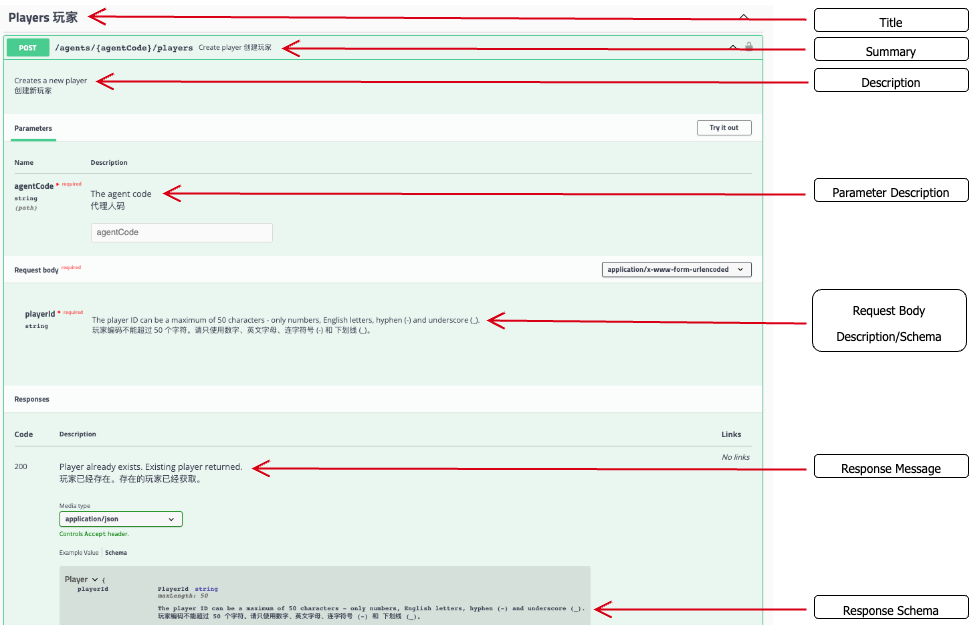
Example
|
Section |
String (English) |
Chinese Translation |
Notes |
|---|---|---|---|
|
Title |
Players |
|
|
|
Summary |
Create player |
|
|
|
Description |
|
|
Please come up with this section - I want to describe what this API method does. |