
This system is in place to inform the agent of the current state of failed transactions on the MG+ system.
It is then the responsibility of the agent to process the transaction on their system according to the failed state, and mark the transaction as resolved on the MG+ system.
Several events can cause a failed transaction to occur, for example:
-
Agent API error
-
Timeout to the Agent API
-
Other network or software related issues
The failed transactions queue is a list of bets that have failed (actionType:Rollback) and wins that have failed (actionType:Credit)
It is important to understand that it may be possible that we resend a bet or win that you have already processed, but still appears in the queue because we did not get a timely response (or some other error).
The action required depends on whether you have already processed the transaction or not:
|
|
Bet (actionType:Rollback) |
Win (actionType:Credit) |
|---|---|---|
|
Already processed on your system |
You need to refund the original bet amount |
No action |
|
Not processed on your system |
No action |
You need to credit the player |
In the case where there is a win, the player will be unable to continue playing the game until the transaction is cleared from the queue.
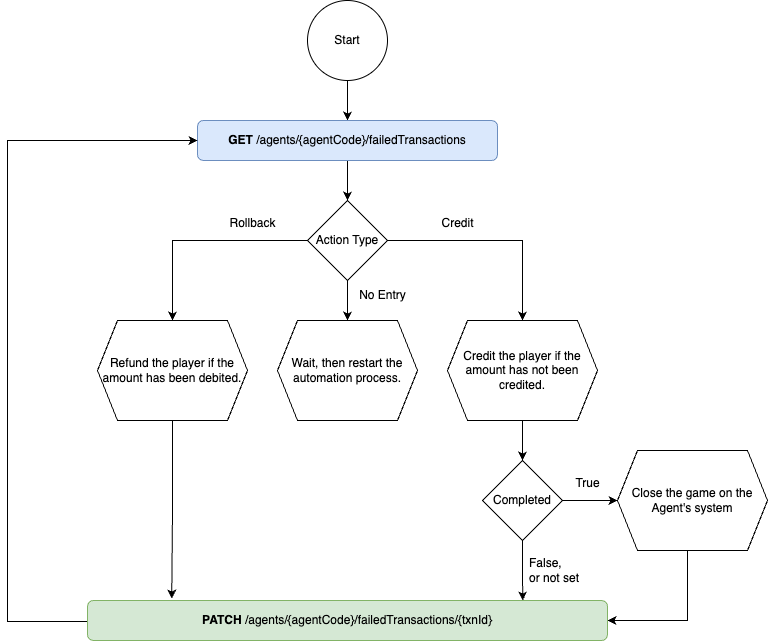
In all cases, you will then need to call PATCH /failedTransactions for that txnId which will clear the transaction from the queue.
Transaction event types with a txnEventType of TOURNAMENT, PROMOTION, ACHIEVEMENT, or STORE will be returned for a period of up to seven days from their creation. If these transactions are not resolved within this time frame, they will be marked as permanently failed and removed from the queue. Attempting to patch such a transaction after the seven-day period has expired will result in a "404 Not Found" error.
For other transaction event types, they will remain in the failed transactions queue and can be patched to mark them as resolved using this method. If a transaction is not found in the queue, a "404 Not Found" error will also be returned.
To implement this method, you must set up:
-
A service to regularly fetch failed transactions and to patch the failed transactions.
-
This service needs to run every 3 to 5 minutes maximum.
Failure to patch within the allowed time can result in incomplete game data.
Refer to the diagram below for guidance on creating this service.
Response Codes in Relation to Failed Transactions
|
Code |
Message |
Failed Transaction in case of debit failure |
Failed Transaction in case of credit failure |
|---|---|---|---|
|
4XX |
Any 4XX error |
No |
Yes |
|
500 |
Internal Server Error |
Yes |
Yes |
|
501 |
Not Implemented |
No |
Yes |
|
502 |
Bad Gateway |
No |
Yes |
|
503 |
Service Unavailable |
No |
Yes |
|
504 |
Gateway Timeout |
Yes |
Yes |
|
505 |
HTTP Version Not Supported |
No |
Yes |
|
506 |
Variant Also Negotiates |
No |
Yes |
|
507 |
Insufficient Storage |
No |
Yes |
|
508 |
Loop Detected |
No |
Yes |
|
510 |
Not Extended |
No |
Yes |
|
511 |
Network Authentication Required |
No |
Yes |