
This section explains how to manage games in the system, including adding, editing, and deleting games, configuring Module/Client ID pairs, and understanding key validation rules.
Adding a Game
-
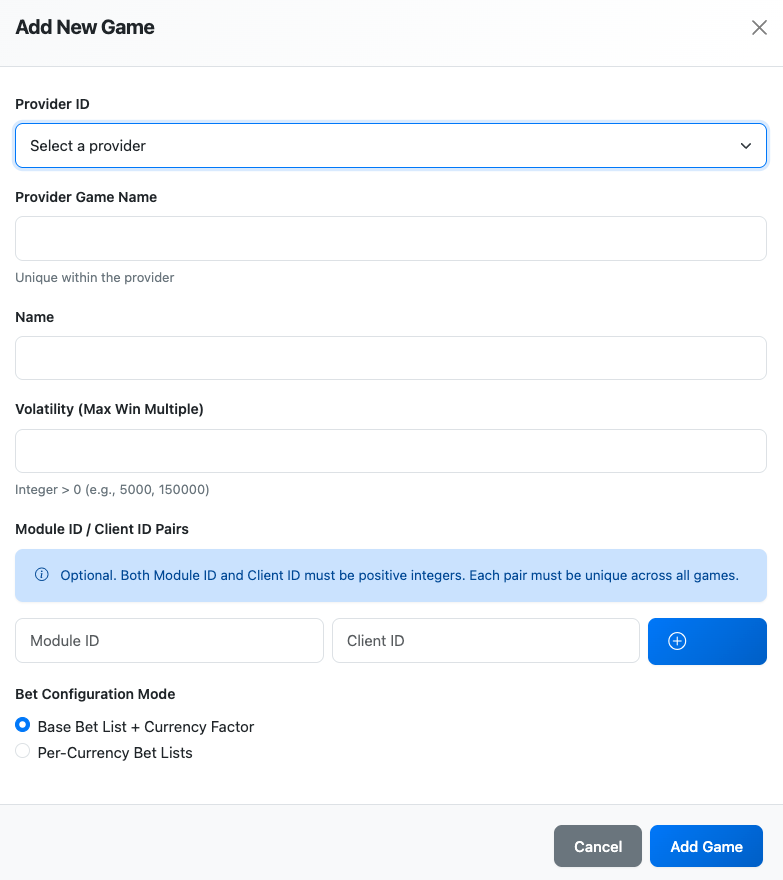
Click Add Game button
-
Fill in required fields:
-
Provider ID: Select from active providers
-
Provider Game Name: Unique identifier within the game provider (alphanumeric, hyphens, underscores only)
-
Name: Display name for the game
-
Volatility: Must be between 1 and 100,000
-
Bet Config Mode: Choose Base + Currency Factor or Per-Currency
-
-
(Optional) Add Module ID / Client ID pairs
-
Click Add Game to save
Adding Module ID / Client ID Pairs
-
Enter Module ID (integer > 0)
-
Enter Client ID (integer > 0)
-
Click Add button
-
Repeat to add more pairs (maximum 50 per game)
Editing a Game
-
Click the edit (pencil) icon next to the game
-
Modify Name, Volatility, or Module/Client pairs
-
Click Save Changes (button only enables when changes are made)
Note: Provider ID, Provider Game Name, and Bet Config Mode are cannot be edited.
Deleting a Game
Warning: Deleting a game will remove all associated bet configurations.
-
Click the delete (trash) icon next to the game
-
Confirm the deletion when prompted
Validation Rules
-
Provider Game Name can only contain letters, numbers, hyphens, and underscores
-
Provider Game Name must be unique within each provider
-
Module ID / Client ID pairs must be unique across all games
-
Volatility must be between 1 and 100,000
-
Maximum of 50 Module ID / Client ID pairs per game