
To start, obtain an STS Token, which acts as the authorization token for all MG+ API interactions.
To generate an STS Token, provide your Agent Code and Agent Secret to STS. In response, you'll receive a JWT token for use in future MG+ API calls.
-
Find your STS URL. This can be found in MG+ Backoffice, or given to you by your Account Manager.
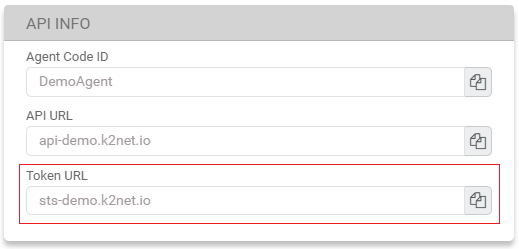
-
Create a request.
-
Replace the URL with your STS URL.
-
In the request example, this is the sts-demo.k2net.io portion of the endpoint.
-
-
Replace the
client_idwith your Agent Code.-
In the request example, this is the DemoAgent portion of the request header.
-
-
Replace the
client_secretwith your Agent Secret.-
In the request example, this is the 4c7dd71e1b5ab52c27beb283fae9ab portion of the request body.
-
-
|
Request Example |
|---|
|
Request Headers JSON
Request Body JSON
|
-
Your STS Token is returned in the
access_tokenresponse.
|
Response Example |
|---|
|
200 Response Body Example JSON
|
Checklist
- Did you use the correct STS URL from your Account Manager or MG+ Backoffice?
- Did you put /connect/token after the STS URL?
- Did you use the POST method?
- Is your IP address whitelisted?