
This section provides operators with additional information and tips for integrating with the Free Games APIs. To access Free Games API responses and responses examples, please refer to the Free Games endpoints available on the DevPortal.
Offer Management APIs
POST Create a New Free Game Offer
This API allows the operator to create a new free game offer.
Regarding the Parameters
The required parameter for this endpoint is the agentCode.
Regarding the Request Body
-
The offer name is not unique and can be duplicated.
-
The
durationAvailableInDaysAfterAwardedproperty refers to the validity period.-
The default value for this is set to 7 days.
-
The validity period is limited to a range of 1 to 99 days.
-
-
The
numberOfRoundsproperty is limited to a range of 1-100 rounds. The number of rounds set by the operator will be reflected on the player’s page.
-
It is important to note that the number of rounds is shared across the eligible games of the offer. For example, in a scenario where there are 3 game codes added to the offer and the
“numberOfRounds": 10, the player can play a total of 10 rounds in all 3 games, not 10 rounds in each game. -
The
offerAvailableFromDateUTCandofferAvailableToDateUTCproperty refers to the offer period.-
If the
offerAvailableFromDateUTCis not provided, the default is set to the current time of the offer creation. -
If the
offerAvailableToDateUTCis not provided, the default is set to 3 months from the start date. -
The maximum period of time that an offer can be active for is 1 year.
-
Regarding the 200 Response
-
The
offerGuidis unique, regardless if there’s a duplicate offer name in the system. -
The
reuseproperty in the 200 response determines if the offer returned pertains to a newly generated offer or if it corresponds to an existing offer with identical parameters. When creating a new offer, the system checks for any other offers that have the same input parameters and have been created within the last hour. If a match is found, instead of creating a new offer, the system will provide the GUID of the existing offer.
GET Retrieve Information Regarding Existing Free Game Offers
This API allows the operator to get a list of existing free game offers and their associated information.
Regarding the Parameters
The required parameter for this endpoint is the agentCode. Other parameters are optional to narrow down your request results.
-
offerStatuscan be set to search for Active or Closed offers.
Regarding the 200 Response
-
The
numberOfAssignedPlayersdoes not equal to thenumberOfInstancesas a player can be assigned to the same offer multiple times. For example, when a player is assigned twice, thenumberOfAssignedPlayersis one, but thenumberOfInstancesis two. -
The
nearestCostPerBet(also known as the value per round) is the minimum bet of the game.
PATCH Update Offer Details
The operator can utilize this API to modify the information of the free game offer, on the condition that it has not been utilized yet.
Regarding the Parameters
The required parameters for this endpoint include the offerGuid and the agentCode. To ensure that the updates are applied to the correct offer, it is necessary to provide the exact offerGuid when making this request.
Regarding the Request Body
-
The operator has the flexibility to remove any properties from the request body that they do not wish to update. This allows them to make updates only to the specific properties they require.
PATCH Close a Free Game Offer
Utilizing this API will result in the closure of a free game offer. Operators can choose to keep or remove assigned instances.
Regarding the Parameters
The required parameters for this endpoint include offerGuid and agentCode. The request body must include the cancelAwardedInstances field, which indicates how to handle existing instances of this offer.
-
To remove existing instances, use
cancelAwardedInstancesset to true. -
To keep existing instances, use
cancelAwardedInstancesset to false.
Player Management APIs
POST Assign a Player to a Free Game Offer
This API allows operators to assign a player to a free game offer, creating an instance of the offer for the player to use.
Regarding the Parameters
The required parameters for this endpoint include the playerId, the offerGuid, and the agentCode.
Regarding the Request Body
-
The
offerAvailableToPlayerFromDateUTCproperty specifies the date and time from which players can start playing the free game offered. If this property is not provided, it will default to the current date and time. It is essential to ensure that the date falls within the offer period.-
The latest starting date for an instance can be set as the last day of the offer period, allowing players to use the instance until the end of the validity period.
-
Regarding the 202 Response
Upon successfully assigning a player to the offer, the API should return a 202 response. The response will include the unique instanceGuid.
POST Assign Multiple Players to a Free Game Offer
This API allows operators to assign multiple players to a free game offer, creating an instance per player.
If the operator enters the same player ID multiple times, it will create multiple instances for the same player.
Regarding the Parameters
The required parameters for this endpoint include the offerGuid and the agentCode.
Regarding the Request Body
-
The
offerAvailableToPlayerFromDateUTCproperty specifies the date and time from which players can start playing the free game offered. If this property is not provided, it will default to the current date and time. It is essential to ensure that the date falls within the offer period.-
The latest starting date for an instance can be set as the last day of the offer period, allowing players to use the instance until the end of the validity period.
-
-
The operator can enter a list of player IDs under the
playersproperty.-
The player ID must be alphanumeric (A-Z, 0-9) and can contain a maximum of 50 characters. The ID may also contain underscores ( _ ) or hyphens ( - ).
-
The maximum allowed number of players is 20000.
-
If a player ID appears multiple times, each occurrence will result in a duplicate assignment instead of updating a single record.
-
Regarding the 202 Response
Upon successfully assigning a player to the offer, the API should return a 202 response. The response will include the unique batchGuid, as well as a list of instances matched per player ID. Each player will be paired with a unique instanceGuid.
PATCH Update the Status of an Instance
This API allows operators to update the status of an instance.
Only Assigned and Player Rejected instances can be changed to other statuses (within the validity period).
Assigned → changed to Cancelled (for when an operator wants to cancel an instance assigned to a player)
Player Rejected → changed to Assigned (for when an operator wants to reinstate the offer for the player, the instance GUID will remain unchanged in this scenario)
If the instance is cancelled when a player is halfway through a game, the player will see a warning indicating that the game session has been terminated and that they will need to close the game.
Regarding the Parameters
The required parameters for this endpoint include the instanceGuid, the playerId, and the agentCode.
Regarding the Request Body
-
The
offerAssignmentStatuscan be set to either “Cancelled” or “Assigned”.
GET Retrieve Information Regarding Offers Assigned to a Player
This API method will return a list of offers assigned to the specific player.
Regarding the Parameters
The required parameters for this endpoint include the playerId and the agentCode. Other parameters are optional to narrow down your request results.
-
The
offerAssignmentStatusparameter can be set to one of the instance statuses - Assigning, Assign Failed, Assigned, Player Rejected, Cancelled, Cancelling, Cancel Failed, Fully Consumed, and Expired. -
offerStatuscan be set to search for Active or Closed offers.
Regarding the 200 Response
The response contains information about the offers assigned to the players, as well as the details of each instance.
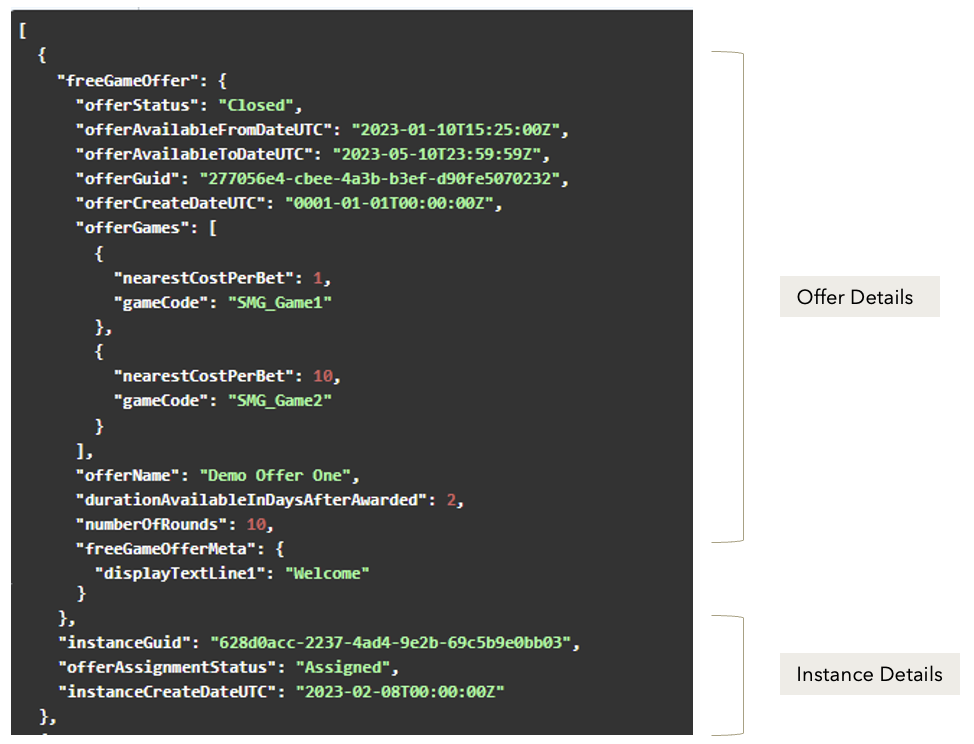
GET Retrieve a List of Players Assigned to the Free Game Offer
This API method will return a list of players assigned to a specific free game offer.
Regarding the Parameters
The required parameters for this endpoint include the offerGuid and the agentCode. Other parameters are optional to narrow down your request results.
-
The
offerAssignmentStatusparameter can be set to one of the instance statuses - Assigning, Assign Failed, Assigned, Player Rejected, Cancelled, Cancelling, Cancel Failed, Fully Consumed, and Expired. -
The
startAvailableFromDateUTCand theendAvailableFromDateUTCparameters reflect the availability period where the player can play the free game.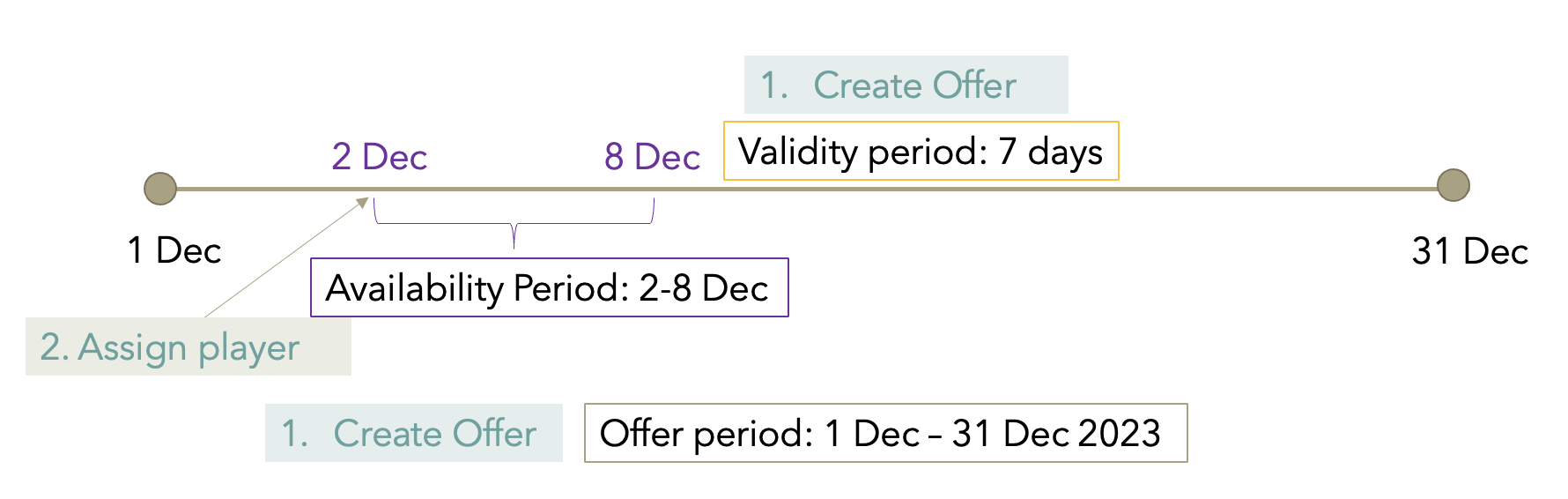
GET Retrieve Batch Upload Details
This API allows the operator to retrieve the details of a batch upload. The batch upload can be one of the following types:
-
Batch Assignment
-
Batch Cancellation
Regarding the Parameters
The required parameters for this endpoint include batchGuid and agentCode.
Regarding the 200 Response
Upon receiving a successful 200 response, the API will provide the following information:
-
Player Assignment Details List
-
The unique instance GUID.
-
The instance creation date. Note that this is not the date from which the player can start using the offer; that information is associated with the
offerAvailabletoPlayerFromDateUTCproperty. -
offerAssignmentStatus– Indicates the status of the instance. When a batch job is cancelled and the instance status is Assigned, the response will includeisPartiallyConsumed=true. -
Whether the player ID existed in the MG+ system prior to the offer assignment; if not, the system will create this player during the batch upload process.
-
-
Batch Information
-
The unique batch GUID.
-
The batch upload status indicates the current state of the batch. If all instances have been created, the batch upload status will be Assigned. If no instances or only some instances have been created, the status will be Assigning. If all instances have been cancelled, the batch upload status will be Cancelled. If some instance is still in the process of being cancelled, the batch upload status will be Cancelling.
-
The name of the .CSV file. The .CSV file name is a property used for MG+ Backoffice functionalities and can be disregarded.
-
The date from which the offer is available from for the player.
-
The batch creation date.
-
The details of the free game offer associated to the batch upload.
-
-
Batch Summary
For Assigned instances:
-
totalRequests: The total number of players listed in the batch assignment process. -
successfulRequests: The number of players successfully assigned to the offer with an instance status of "Assigned." -
failedRequests: The number of players who encountered errors during the assignment process resulting in an instance status of "AssignFailed." Players with errors will not be assigned to the offer. -
newPlayers: The number of new players that have been created and assigned to the offer, as the player IDs listed do not exist in the MG+ system.
For Cancelled instances:
-
totalRequests: The total number of players listed in the batch assignment process. -
successfulRequests: The number of players successfully assigned to the offer with an instance status of "Assigned." -
failedRequests: The number of players who encountered errors during the assignment process resulting in an instance status of "AssignFailed." Players with errors will not be assigned to the offer. -
newPlayers: The number of new players that have been created and assigned to the offer, as the player IDs listed do not exist in the MG+ system. -
nonCancellableRequests: Number of instances that cannot be cancelled (partially or fully consumed instances, player rejection, expired offer, assignment errors, or cancellation API errors). -
cancellingRequests: Number of instances that are currently being cancelled. -
cancelledRequests: Number of instances that have been successfully cancelled.
GET Retrieve a List of Historical Batch Uploads
This API allows the operator to retrieve a list of historical batch uploads.
Regarding the Parameters
The required parameter for this endpoint is the agentCode. Other parameters are optional to narrow down your request results.
-
The
offerGuidStartsWithand thebatchGuidStartsWithparameters support partial search, as long as the beginning of the string matches. -
The
offerNameContainsparameter supports partial search. -
The
batchAssignmentStatuscan be set to search for Assigning, Assigned, Cancelling, or Cancelled batch uploads. -
The
uploadStartDateUTCanduploadEndDateUTCparameters can be set to search for batch jobs that started or ended at the specified dates.
Regarding the 200 Response
Upon receiving a successful 200 response, the API will provide the following information:
-
Batch Information
-
The unique batch GUID.
-
The batch upload status indicates the current state of the batch. If all instances have been created, the batch upload status will be Assigned. If no instances or only some instances have been created, the status will be Assigning. If all instances have been cancelled, the batch assignment status will be Cancelled. If some instance is still in the process of being cancelled, the batch upload status will be Cancelling.
-
The name of the .CSV file. The .CSV file name is a property that exists for MG+ Backoffice functionality and can be disregarded.
-
The date from which the offer is available to the player.
-
The batch creation date.
-
The details of the free game offer associated with the batch upload.
-
-
Batch Summary
For Assigned instances:
-
totalRequests: The total number of players listed in the batch assignment process. -
successfulRequests: The number of players successfully assigned to the offer with an instance status of "Assigned." -
failedRequests: The number of players who encountered errors during the assignment process resulting in an instance status of "AssignFailed." Players with errors will not be assigned to the offer. -
newPlayers: The number of new players that have been created and assigned to the offer, as the player IDs listed do not exist in the MG+ system.
For Cancelled instances:
-
totalRequests: The total number of players listed in the batch assignment process. -
successfulRequests: The number of players successfully assigned to the offer with an instance status of "Assigned." -
failedRequests: The number of players who encountered errors during the assignment process resulting in an instance status of "AssignFailed." Players with errors will not be assigned to the offer. -
newPlayers: The number of new players that have been created and assigned to the offer, as the player IDs listed do not exist in the MG+ system. -
nonCancellableRequests: Number of instances that cannot be cancelled (partially or fully consumed instances, player rejection, expired offer, assignment errors, or cancellation API errors). -
cancellingRequests: Number of instances that are currently being cancelled. -
cancelledRequests: Number of instances that have been successfully cancelled.